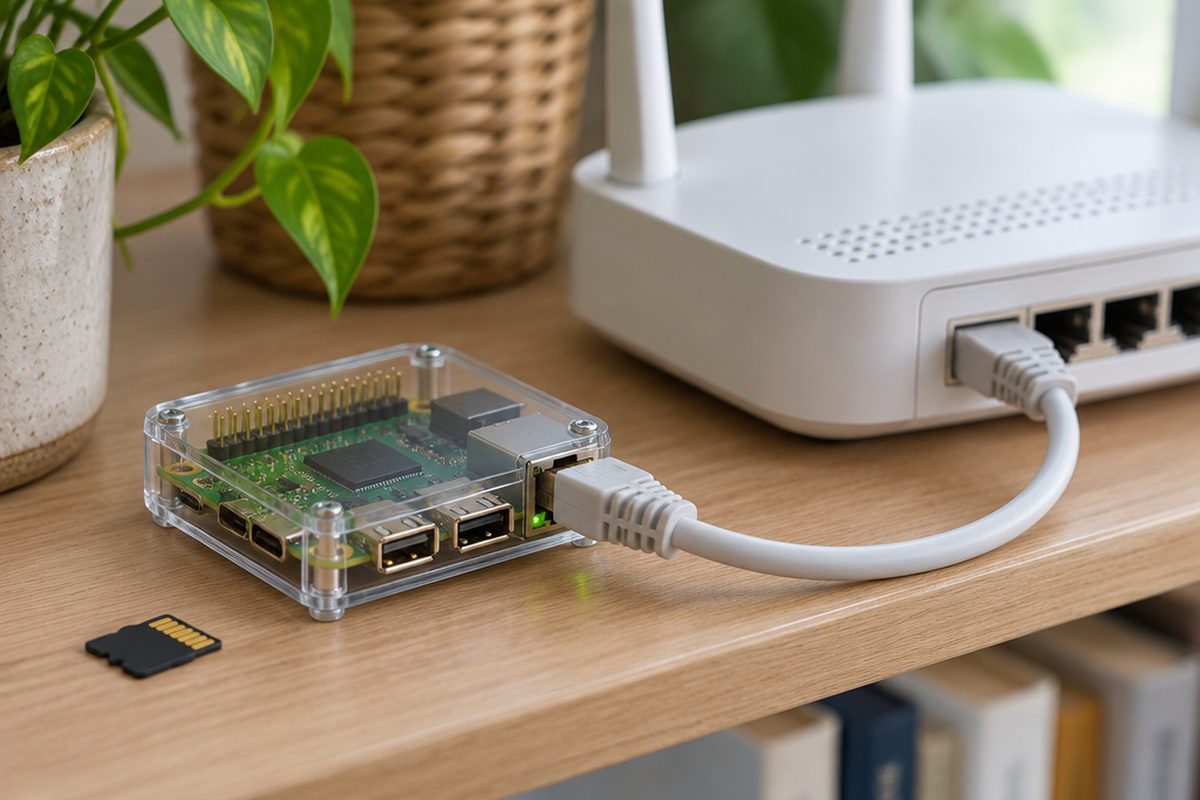
Pi-hole is free software that sits on your network and quietly blocks adverts and trackers for every device at once: phones, laptops, smart TVs and games consoles. It runs happily on a small Raspberry Pi that costs less than a few months of most ad-free subscriptions. You do not need to know Linux, but you will copy and paste a couple of commands.
As an Amazon Associate I earn from qualifying purchases. The buttons below go to Amazon, and I may earn a commission if you buy, at no extra cost to you.
The kit you need
Raspberry Pi starter kit
Pi-hole needs very little power. Any Raspberry Pi 3, 4 or 5 is plenty, and a kit usually includes the case and power supply.
Official Raspberry Pi power supplyoptional
Cheap chargers cause random crashes. Only buy this if your kit does not include a proper supply for your Pi model.
microSD card, 32GB, A1 rated
This holds the operating system. A name-brand card lasts far longer than an unbranded one.
Ethernet cable
Plug the Pi into your router with a cable rather than Wi-Fi. DNS should be rock solid, and a cable is more reliable than wireless.
Our pick: UGREEN Ethernet Cable 1m
Step by step
Put the operating system on the card
On your computer, download Raspberry Pi Imager from raspberrypi.com. Choose your Pi model, then pick Raspberry Pi OS Lite (64-bit). Before it writes, open the settings and set a hostname (for example
pihole), turn on SSH, and create a username and password. Write the card, put it in the Pi and plug in the Ethernet cable and power.Reserve a fixed address for the Pi
Pi-hole needs an address on your network that never changes. Log in to your router, find the list of connected devices, and look for the setting called DHCP reservation, static lease or address reservation. Reserve the Pi's current address for it. Write that address down, you will need it in step 5.
Connect to the Pi
On a Mac, open Terminal. On Windows 10 or 11, open PowerShell. Type the following, swapping in the username you chose:
ssh yourusername@pihole.localSay yes if it asks about the fingerprint, then enter your password.
Install Pi-hole
Run the official installer:
curl -sSL https://install.pi-hole.net | bashIt asks a few questions. The defaults are fine: keep the current address, choose a DNS provider you trust, and leave the web admin interface switched on. When it finishes, set your own admin password:
sudo pihole setpasswordIf you would rather read what the installer does before running it, the Pi-hole project documents a manual download method on its website.
Point your network at it
In your router settings, find DNS (often under LAN or DHCP settings) and enter the Pi's address as the DNS server. Save, then reconnect a phone or laptop to Wi-Fi so it picks up the new setting. Some internet provider routers, including a number of BT, Sky and Virgin hubs, will not let you change DNS. If yours is locked, you can turn on Pi-hole's own DHCP server and switch the router's off, or set the DNS on individual devices instead.
Check it is working
Visit
http://pi.hole/adminin a browser and log in. The dashboard should start counting queries and blocked requests within a minute or two. Browse a few ad-heavy websites and watch the numbers climb.
Handy extras
Not essential, but people often pick these up at the same time.
- Raspberry Pi 5
- Raspberry Pi Zero 2 W kit
- Case with a cooling fan
- USB microSD card reader
- Short Ethernet patch cable
Common questions
Will it block YouTube ads?
No. YouTube serves its ads from the same addresses as the videos, so DNS blocking cannot separate them. Pi-hole works well for most websites, apps and smart TV tracking.
What happens if the Pi stops working?
If your router only points at the Pi, your internet will seem to stop until it is back. Many routers let you add a second DNS server as a fallback, which keeps things working but lets ads through while the Pi is down.
Can a website break because of it?
Occasionally, yes. If a page will not load or a basket will not work, open the Pi-hole dashboard and look at the recently blocked list. You can allow that address with one click.
More guides
 How to set up mesh Wi-Fi to fix dead spots in your home45 minutesFix weak Wi-Fi upstairs or in the back room with a mesh system. What to buy, where to put each unit and how to set it up with your existing router.
 How to stop your TV buffering when you stream30 minutesFix a smart TV or streaming stick that keeps buffering. Work out whether the problem is the Wi-Fi or the TV, then fix it with a cable or a better stick.
 How to set up a home NAS to back up your photos automatically2 hoursSet up a two-drive NAS that backs up your phone photos and computer on its own, with a simple plan for an offsite copy.