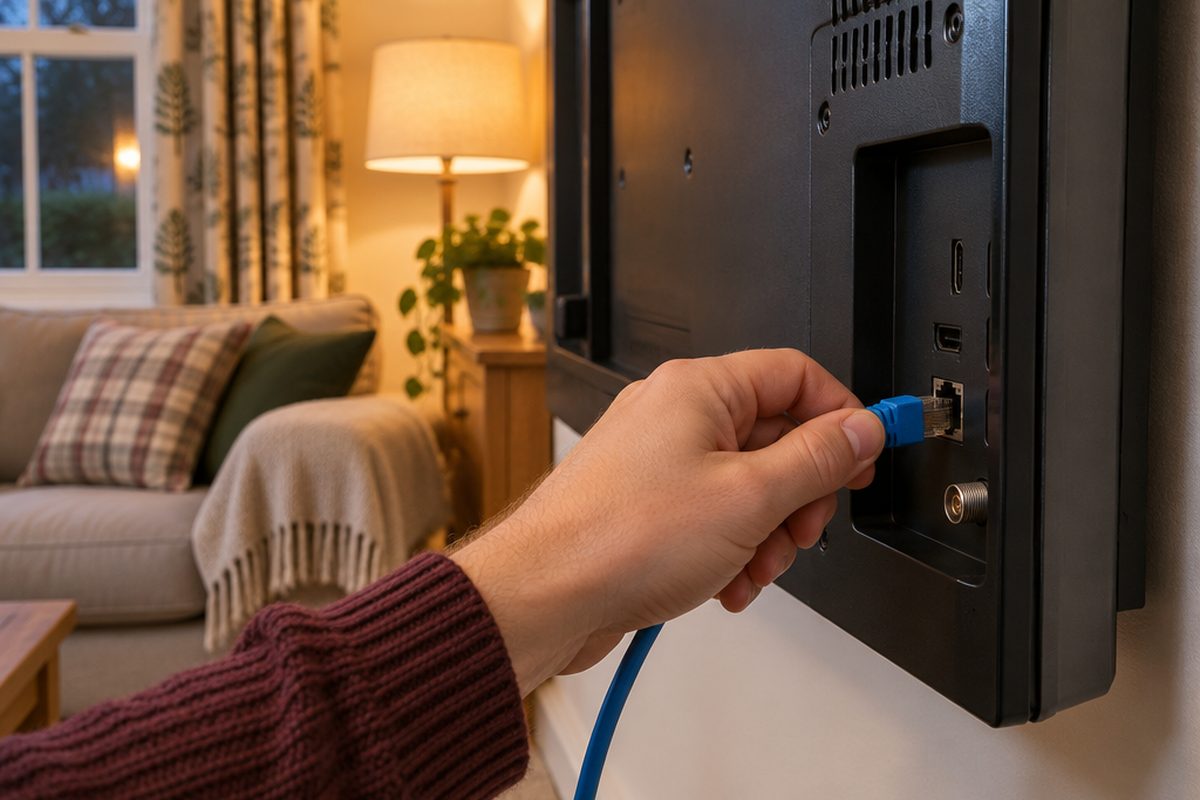
A spinning circle halfway through a film is nearly always a connection problem at the TV, not a problem with your broadband. TVs tend to sit in the worst place for Wi-Fi: against a wall, behind a metal panel, at the far end of the house from the router. The most reliable fix is to stop the TV depending on Wi-Fi at all.
As an Amazon Associate I earn from qualifying purchases. The buttons below go to Amazon, and I may earn a commission if you buy, at no extra cost to you.
The kit you need
Ethernet cable long enough to reach the router
A cable from the router to the TV removes Wi-Fi from the equation. Measure the route along the skirting board before you buy.
Our pick: Cat6 Ethernet Cable 10m
Ethernet adapter for a streaming stickoptional
Most streaming sticks have no network socket. The maker's own adapter adds one and powers the stick at the same time. Buy the one made for your stick.
Newer 4K streaming stickoptional
The apps built into older smart TVs get slow and stop being updated. A current stick with newer Wi-Fi is often a bigger improvement than a new TV.
Our pick: Amazon Fire TV Stick 4K Plus
Powerline adapter kitoptional
If a cable run to the router is not practical, powerline adapters carry the connection through your mains wiring instead.
Our pick: TP-Link TL-PA717 Powerline Kit
Step by step
Check it is the TV and not the broadband
While the TV is buffering, run a speed test on a phone standing next to the router. If the phone is fast there, your broadband is fine and the weak link is between the router and the TV. If the phone is slow too, restart the router and contact your provider before buying anything.
Test the Wi-Fi where the TV is
Hold the same phone right beside the TV and run the test again. A big drop compared with the router tells you the signal at the TV is the problem. For 4K streaming you want a steady 25Mbps or more at the TV.
Run a cable if you can
Plug the Ethernet cable into a spare port on the router and into the socket on the back of the TV marked LAN. In the TV's network settings, choose the wired connection. This is the fix that works every time, and it frees up Wi-Fi for everything else in the house.
Using a streaming stick? Add its Ethernet adapter
Plug the stick's power lead into the adapter, the adapter into the mains, and the Ethernet cable into the adapter. The stick switches to the wired connection on its own.
No way to run a cable? Use the mains
Plug one powerline adapter into a wall socket by the router and connect it to the router. Plug the second into a wall socket by the TV and connect it to the TV. Use wall sockets, not extension leads, or the speed drops sharply.
Still on the TV's built-in apps?
If the connection now tests well but apps are slow to open or keep crashing, the TV's own software is the limit. Plug a current streaming stick into an HDMI port and use that for your apps instead.
Handy extras
Not essential, but people often pick these up at the same time.
- Flat Ethernet cable
- Cable trunking for skirting boards
- Small network switch behind the TV
- High speed HDMI cable
- Mesh Wi-Fi system
Common questions
Do I need faster broadband?
Usually not. A single 4K stream needs around 25Mbps. If a phone next to the router gets much more than that, paying for a faster package will not fix buffering at the TV.
The TV's Ethernet port is slower than its Wi-Fi. Is that normal?
Yes. Many TVs have a network port limited to 100Mbps. That is still several times what a 4K stream needs, and a steady 100Mbps beats a faster connection that keeps dropping.
Would mesh Wi-Fi fix this too?
It can, if you put a mesh unit near the TV, and many mesh units have a network socket you can cable the TV into. See the mesh Wi-Fi guide if other rooms struggle as well.
More guides
 How to set up mesh Wi-Fi to fix dead spots in your home45 minutesFix weak Wi-Fi upstairs or in the back room with a mesh system. What to buy, where to put each unit and how to set it up with your existing router.
 How to set up a home NAS to back up your photos automatically2 hoursSet up a two-drive NAS that backs up your phone photos and computer on its own, with a simple plan for an offsite copy.
 How to back up your computer to an external drive30 minutesSet up automatic backups on a Mac or Windows PC with one external drive. What size to buy, how to switch it on and how to check you can get files back.