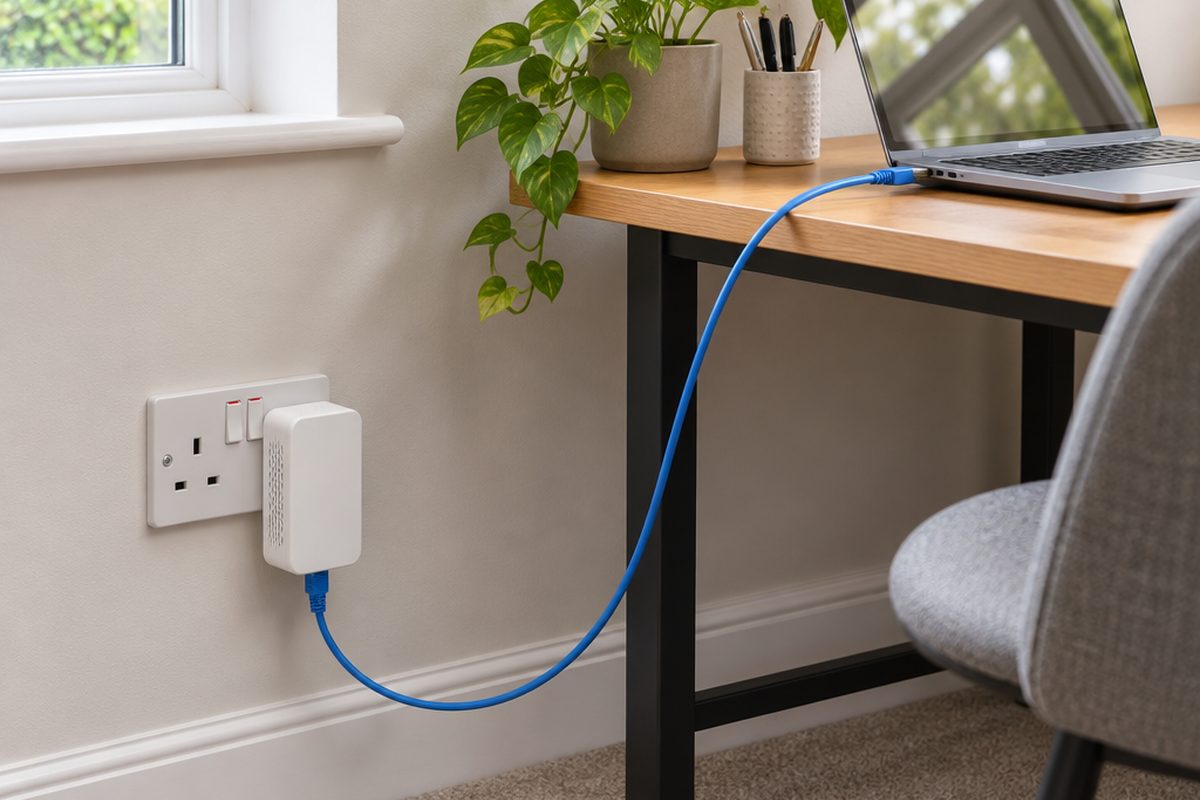
A cable is still the most reliable way to connect a work computer, a games console or a TV, but few people want to drill through walls to run one. Powerline adapters use the electrical wiring already in your walls to carry the connection from the router to another room. They are not perfect in every house, so it is worth knowing the limits before you buy.
As an Amazon Associate I earn from qualifying purchases. The buttons below go to Amazon, and I may earn a commission if you buy, at no extra cost to you.
The kit you need
Powerline adapter kit, two adapters
One plugs in by the router, the other in the room that needs the connection. Look for gigabit ports and pass-through sockets so you do not lose a plug socket.
Our pick: TP-Link PG2400P Passthrough Powerline Kit
Two short Ethernet cablesoptional
One from the router to the first adapter, one from the second adapter to your device. Kits usually include both.
Our pick: Cat6 Ethernet Cable 2m
Powerline adapter with Wi-Fioptional
Choose a kit where the second adapter also broadcasts Wi-Fi if you want better wireless in that room as well as a wired socket.
Our pick: TP-Link TL-WPA4221 Powerline Wi-Fi Kit
Small network switchoptional
Turns the one socket at the far end into several, for a desk with a computer, printer and dock.
Our pick: TP-Link TL-SG105S 5-Port Switch
Step by step
Check both rooms are on the same electrics
Powerline works between sockets fed from the same consumer unit, which is the fuse box. That covers most houses and flats. It usually does not work to an outbuilding with its own separate supply, and it can be weak between different circuits in larger or older homes.
Plug the first adapter in by the router
Plug it directly into a wall socket near the router, then connect it to a spare port on the router with an Ethernet cable. Do not use an extension lead or a surge-protected strip. They filter out the signal the adapters rely on.
Plug the second adapter in where you need it
Again, use a wall socket. Wait a minute or two. The lights on both adapters should show that they have found each other. If the kit has a Pair button, press it on one adapter and then the other within two minutes.
Connect your device
Run an Ethernet cable from the second adapter to your computer, console or TV. It should connect straight away with no password, exactly as if it were plugged into the router.
Test the speed and try another socket
Run a speed test on the connected device. If the result is disappointing, move the far adapter to a different wall socket in the same room and test again. Speed varies a lot from socket to socket, and one a metre away can be twice as fast.
Handy extras
Not essential, but people often pick these up at the same time.
- Three-adapter powerline kit
- Flat Ethernet cable
- USB-C to Ethernet adapter for laptops
- Ethernet adapter for a games console
- Cable clips
Common questions
Will I get the speed printed on the box?
No. The headline figure is a theoretical maximum. In a real house, expect a fraction of it. That is still usually steadier than weak Wi-Fi, which is what matters for video calls and gaming.
Is it safe and private?
Yes. The adapters encrypt the connection between themselves, and the signal does not travel usefully beyond your own electricity meter. Pressing the pair button sets a private key for your pair.
When is powerline the wrong choice?
If your home has very old wiring, or the two rooms are on separate supplies, results can be poor. In that case mesh Wi-Fi with a wired socket on each unit is the better option.
More guides
 How to set up mesh Wi-Fi to fix dead spots in your home45 minutesFix weak Wi-Fi upstairs or in the back room with a mesh system. What to buy, where to put each unit and how to set it up with your existing router.
 How to stop your TV buffering when you stream30 minutesFix a smart TV or streaming stick that keeps buffering. Work out whether the problem is the Wi-Fi or the TV, then fix it with a cable or a better stick.
 How to set up a home NAS to back up your photos automatically2 hoursSet up a two-drive NAS that backs up your phone photos and computer on its own, with a simple plan for an offsite copy.